Screen 7 · Payments

Know who owes what—and send the proper invoice

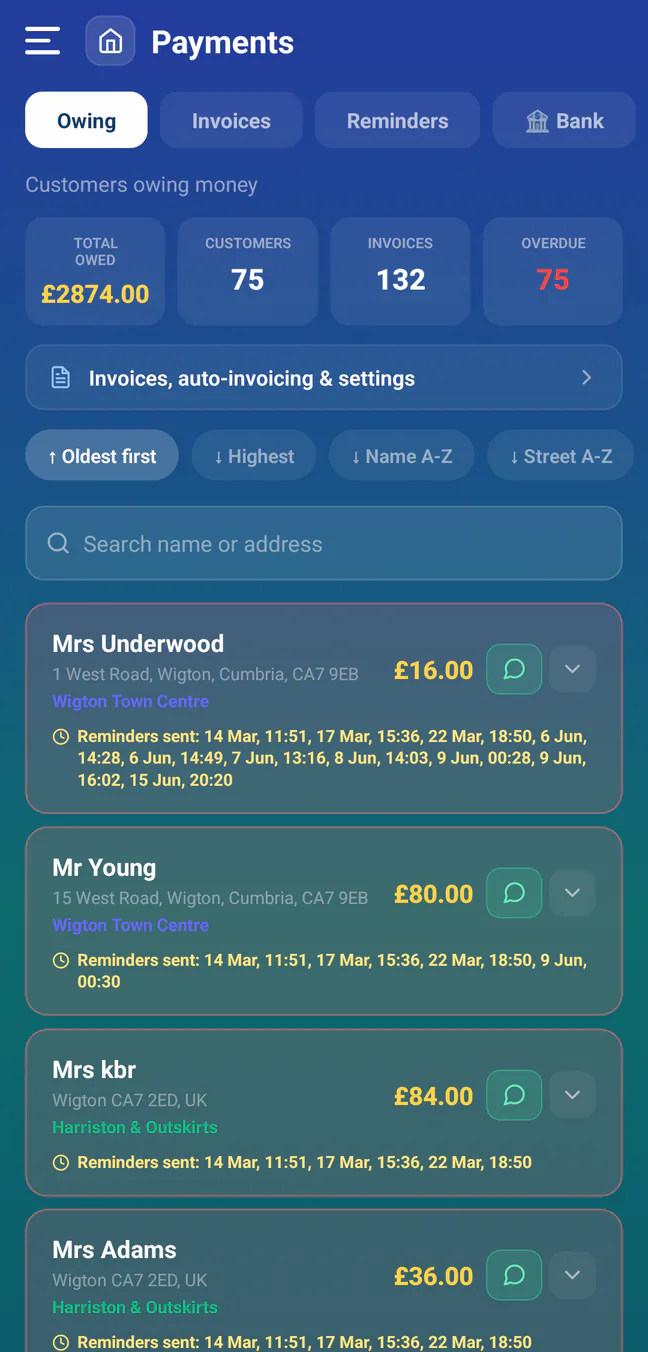
The payments area keeps owing customers, invoices, reminder rules and bank activity in one place. Commercial invoices can be emailed with the generated PDF and secure invoice link, while reminder history stays visible against each debt.

Real RoundRun beta screen · demo data
RoundRun Payments Owing screen showing total debt, customers, invoice count, overdue count and reminder history

Demo debts and customer names are used to show the full working state.

How it functions

Four connected views instead of one long invoice list

  • Owing: group unpaid invoices by customer and see total owed, invoice count and overdue status.
  • Invoices: create them manually or automatically after completion, then email the official PDF and secure invoice link.
  • Invoice controls: set payment terms and due dates; businesses that need it can deliberately enable fixed 20%-inclusive VAT with their VAT number.
  • Reminders: configure staged follow-up by SMS, or choose email for an individual customer with a valid saved address.
  • Send evidence: unsent or failed reminders remain actionable instead of silently advancing the sequence.
  • Bank: review connected bank activity where the account role has permission.
  • Payment handling: record part-payments, overpayments and customer credit without silently erasing the remaining balance.

A fair comparison

Payments are common. The surrounding workflow is the test.

Squeegee and CleanerPlanner both publish invoicing and payment integrations. RoundRun does not claim that collecting money is unique; its difference is the tight link between completed work, auto-invoicing, grouped debt, reminder history and messages sent from the Android phone’s own number.

Invoice creation

Complete sample jobs and confirm exactly when invoices are created and sent.

Part-payment safety

Record too little and too much, then verify the remaining debt or credit.

Reminder evidence

Check whether the next person can see what was sent, when and for which balance.

Provider references: Squeegee payments FAQ · CleanerPlanner

RoundRun is business-management software, not a bank or payment processor. Payment-provider charges and terms may still apply where an external payment service is used.

Make every balance explainable

Trace the job, invoice, reminder and payment

Test with copied invoices first and compare customer totals before making RoundRun the live record.