Can you act?
Open the jobs, customers or invoices behind every headline count.

Screen 1 · Dashboard
The dashboard answers the questions that matter before the van moves: what is due today, how many customers need attention, what is still owed and how the week is earning.
Real Android beta screen · demo data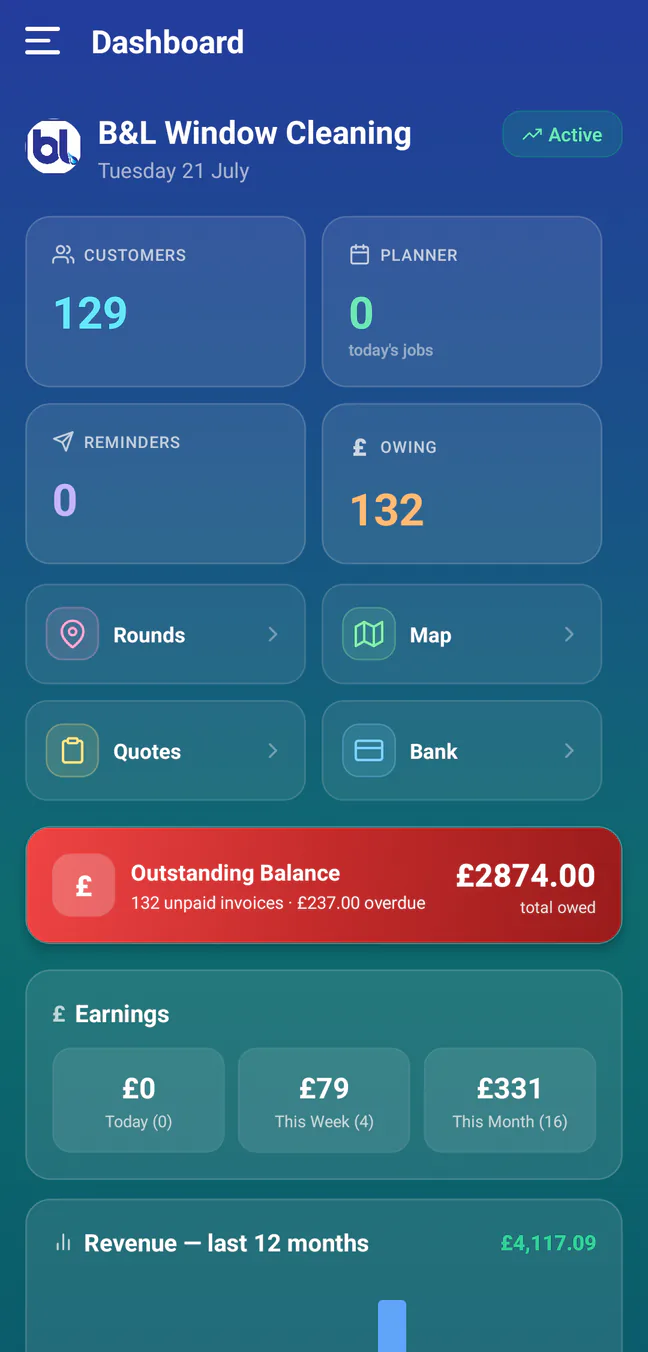
The page continues below the capture with goals and customers needing attention.
How it functions
Each number is a working doorway, not a decorative metric. The dashboard links into the planner, reminders and money screens, while the shortcut row opens rounds, the map, quotes and bank activity.
What to check in any app
During a trial, check whether the numbers are current, whether they respect team permissions and whether tapping them reaches the underlying work. A total that cannot be explained is not a management tool.
Open the jobs, customers or invoices behind every headline count.
Compare dashboard totals with the detailed planner and payment lists.
Hide sensitive earnings or bank information from roles that do not need it.
From signal to action
The beta is free with no card required. Start with copied data and compare every dashboard total with your current system.